Rebuilding Habbo's Unity room renderer
A dev blog from Teppo: Habbo's Unity room renderer rebuild brings smoother rooms, faster loading and fewer frame drops.
Rebuilding Habbo's Unity room renderer
ℹ️ This deep dive covers the room renderer in the mobile app and beta client, not the Classic client. The Classic client is being rebuilt with HTML5.
The first version of our rewritten Unity room renderer shipped in 0.86.0. It replaced a large part of the client's rendering architecture and laid the foundation for much better performance and closer parity with the Classic client.
That first release also had some serious teething problems. Certain combinations of iOS hardware and Metal produced major room-rendering issues, including flickering or black room output. We released several hotfixes while investigating those problems and ultimately removed the experimental rendering path responsible for them.
With version 0.87.0, the renderer is considerably more mature. It keeps the architectural improvements introduced in 0.86.0, uses a more reliable rendering path across platforms and adds another substantial round of performance and loading optimizations.

Why rewrite the renderer?
A Habbo room can contain a surprising number of visual elements. A single piece of furniture may have several layers, animation frames and effects. Add avatars, pets, wall items, floors, walls, masks, landscapes and room helpers, and a busy room can quickly contain thousands of individual pieces that must be updated and drawn in exactly the right order.
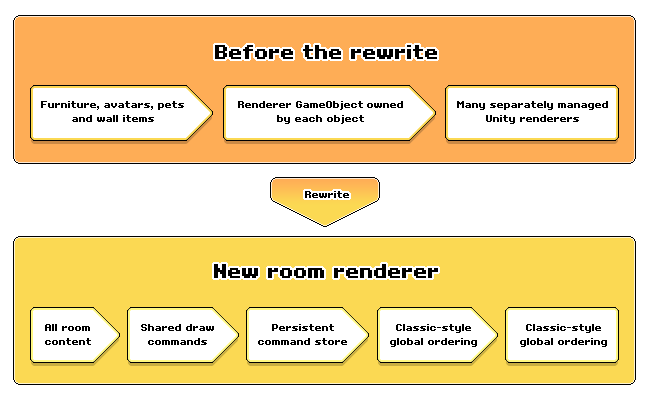
Our previous Unity renderer distributed much of this work across individual room objects. Furniture, avatars, pets and wall items could own their own renderer roots and Unity GameObjects.
That is a natural way to build things in Unity, but it becomes expensive at Habbo scale.
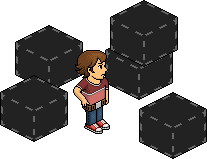
It also makes exact layering difficult. Classic Habbo does not simply divide the room into broad groups such as "furniture," "avatars" and "walls." It builds one globally ordered list of sprites. This is what allows an avatar to appear behind one layer of a chair while remaining in front of another.
Approximating that behavior using separate Unity renderers worked in many cases, but complicated rooms exposed subtle – and sometimes not-so-subtle – differences.
From individual objects to draw commands
The new renderer separates the state of a room object from the way it is presented on screen.
Instead of every object owning its final renderer, furniture, avatars, pets, wall items, masks, room geometry and helper elements produce lightweight draw commands describing what needs to appear:
- Which texture and part of that texture to use
- Where it should be positioned
- Its color, blend mode and visual effects
- Its ordering relationship with other room elements
These commands enter one shared stream and are ordered using rules based on the Classic client.
This gives the renderer a complete view of the room. It can correctly interleave an avatar with the foreground and background layers of a chair instead of treating the whole avatar and the whole chair as two indivisible objects.
Fewer GameObjects, more shared meshes
One of the largest architectural changes was removing the renderer-owned GameObjects previously created for normal furniture, wall items, avatars and pets.
The client still uses GameObjects where they make sense, including parts of the structural room geometry, previews and helper surfaces. They are simply no longer the presentation identity of every visible room object.
The new system combines compatible draw commands into retained meshes. A shared mesh can contain many furniture or avatar parts that previously passed through separate object-owned renderers.
Those meshes remain alive between updates. If most of a room has not changed, there is no reason to rebuild and re-upload all of it.
Besides reducing GameObject and component overhead, this gives the renderer much tighter control over what work actually needs to happen.
Updating only what changed
A room containing thousands of static elements should not be rebuilt because one avatar took a step or one piece of furniture advanced its animation.
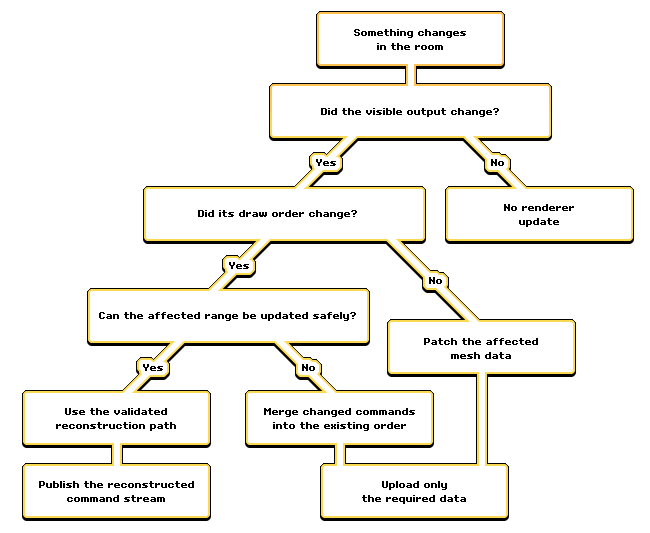
The renderer now maintains a persistent command store. Each command has a stable identity, allowing us to distinguish between different kinds of change:
- The visual data changed, but the command stayed in the same position.
- An object moved far enough to change its order relative to nearby objects.
- The number or shape of an object's visual layers changed.
- An object entered or left the room or visible area.
- An animation advanced but produced exactly the same visible result.
In the simplest cases, the renderer patches only the affected mesh data. If an animation tick does not change its final visual output, it may require no rendering update at all.
More complicated ordering and lifecycle changes are merged into the existing command stream. A complete reconstruction remains available as a safety path, but it is no longer the default response whenever anything moves.
The same principle applies outside the camera. Avatars and animated furniture can continue updating their state without repeatedly uploading visual changes that cannot currently be seen.
Improving how rooms load
The rewrite also gave us an opportunity to improve how room content appears during loading.
Previously, entering a large room could produce a burst of work when thousands of furniture objects were created, initialized, added to texture atlases and handed to the renderer at around the same time. Even if the room loaded successfully, that work could produce long frame stalls.
Room loading now prioritizes the furniture that is actually visible. Initial visualization work is distributed across controlled batches instead of allowing the complete room to become one enormous frame. Offscreen furniture can prepare its visual command data separately, allowing it to appear with less work when the camera later reaches it.
Furniture and avatar assets extracted from downloaded bundles have also been moved further onto Unity's asynchronous loading path, reducing synchronous file and asset-loading stalls on the main thread.
The result is not simply a shorter loading screen in every room. The more important improvement is smoother and more progressive room entry, with fewer large pauses while furniture becomes ready.
In one heavy warm-cache room re-entry test, a furniture-update spike that previously exceeded 1,270 ms was reduced to under 39 ms by distributing initialization across measured batches. In the same workload, the largest floor-furniture processing step fell from approximately 1,211 ms to 44 ms.
Those are worst-frame spikes from an intentionally extreme test – not normal loading times – but they show why scheduling this work properly matters. A single very slow frame can make the whole room entrance feel frozen even when the total amount of work has not changed as dramatically.
Loading avatars more efficiently
Avatar loading received its own set of improvements.
Rooms with many users or bots previously queued avatar requests largely one at a time. Cached figures could still pass through placeholder and asset-processing work that had effectively already been completed. In some cases, a successfully loaded avatar was even sent through part of the creation pipeline a second time before replacing its placeholder.
The updated system can recognize figures whose required assets are already available and take a much shorter path. Shared avatar bundles are registered once instead of being repeatedly processed for every avatar using them, and completed figures can replace their placeholders without restarting the request.
We also keep the previous complete avatar visible while a figure or clothing change is being prepared. The updated appearance is published once it is ready, avoiding unnecessary disappearance and reappearance during the transition.
In an internal cached re-entry test containing 52 room avatars, the time spent draining avatar loading requests fell from approximately 100 ms to 19 ms – an improvement of about 81%.

Why 0.86.0 had problems on iOS
During development we tested a lower-level, more experimental rendering approach that looked promising for performance. In practice, it caused room-only black flickering on some older iOS devices, and turned out to be slower than our main approach in heavy-room testing anyway. We removed it rather than building platform-specific workarounds – every platform now runs on the same, more stable renderer path described above.
What did the rewrite improve?
The improvements vary heavily by room and workload.
In one large visible-room stress test, median Unity PlayerLoop time fell from approximately 30.6 ms to 6.5 ms – an improvement of about 79%.
Within the same test:
- CPU time spent applying shared room-rendering updates fell from approximately 24.4 ms to 2.8 ms
- room draw-command collection fell from approximately 21.7 ms to 1.2 ms sprite-renderer reconstruction fell from approximately 19.4 ms to 2.8 ms
They are targeted internal stress tests rather than a promise that every device or room will become 79% faster. A quiet room on a newer phone may show a much smaller difference, while a large or highly animated room has far more redundant work for the new renderer to eliminate.
The practical goals of the work are:
- Smoother movement in large and crowded rooms
- Fewer rendering and loading-related frame-time spikes
- Faster preparation of cached furniture and avatars
- Less CPU work when only a small part of the room changes
- More consistent layering between furniture, avatars and room geometry
- More stable behavior as room complexity increases
A stronger foundation
Most of this rewrite is invisible by design. It does not replace Habbo's visual style or change what a room is supposed to look like. It changes how efficiently – and how faithfully – the Unity client produces that image.
Version 0.86.0 was the first real-world release of this architecture. It proved the overall direction, but also exposed platform problems that our earlier testing had not caught.
Version 0.87.0 is the more complete version of that work: the unstable rendering experiment has been removed, the retained renderer has been optimized further, room and avatar loading have received significant improvements, and many of the edge cases found after the initial rollout have been addressed.
There will always be unusual furniture, effects and room combinations to test, and we will continue fixing any parity issues that surface. But the central rewrite is now in place – and 0.87.0 gives us a much more stable and efficient foundation to build on.

- Teppo

Discussion
Join the Discussion!
Login with Discord to share your thoughts and help other players.
Login with DiscordNo comments yet
Be the first to share your thoughts!